

What Meta’s New Business Terms Mean for Your Website
If you run a business Page in Ocala, Belleview, Dunnellon or anywhere in Marion County, you may have seen the posts going around this week. Small business owners are saying Meta is about to “steal” their websites to train AI, and some of them are even deleting their Pages over it.
So I dug into it. I read the terms, the reporting and the reactions, and I want to walk you through what actually changed, what didn’t, and what you can do about it. I’ll also share where I land on the bigger question everyone is asking: is it AI theft?
Watch The Video That Breaks Down This Blog
https://drive.google.com/file/d/1mpv_m9AUroZTliFDJtMhgt6BWmT7kKru/view?usp=sharing
What Meta Changed in Its Business Terms
Meta has one set of rules for personal accounts and a separate set, called the Commercial Terms, for anyone using its apps for business. In early October, Meta notified business users through a blog post and Meta Business Suite that updated Commercial Terms would take effect on October 30, 2026.
According to Search Engine Journal, these terms will apply to any business use of Meta’s products, which yes, includes a small local business that manages a Facebook Page.
You also don’t have to sign anything. The terms say that by continuing to use Meta’s products for business after the update, you agree to them. If you don’t agree, the terms say you “may stop all access or use of our Products for business or commercial purposes.” There is no opt-out box.
The Original “Train” Clause
On October 15, Nieman Lab published the new crawling language in full, along with the views of three legal experts who reviewed it. The clause authorized Meta to use “web scrapers, bots, robots, spiders, crawlers, and user agents,” and even “create test credentials,” to collect content from any websites “associated with your products or services.”
Then came the sentence that set off alarms. Meta “may use any content from such domains, web pages, or URLs to provide, develop, improve, research, train, and maintain the integrity of” its products. This means if your business is on Meta and your website is linked to it, the original wording could be read as permission for Meta to collect your site’s content and use it to train AI.
Matt Topic, a media and intellectual property attorney at Loevy & Loevy, called it “a remarkable provision to bury in [the] terms of service, given that this would give Meta access to material that would likely cost many millions of dollars in a licensing market.” Cornell Law School professor James Grimmelmann added that for news publishers, it “clearly represents permission to Meta to train AI on any content from their sites.”
What Meta Removed After the Backlash
The pushback was incredibly fast. News publisher groups in the U.S., the U.K. and Europe objected publicly and by Oct 17, Meta had revised the clause. Here’s how they compare when checking the terms on Meta’s site on October 19, 2026.
| Original version (reported Oct 15) | Revised U.S. version (live as of Oct 19) | |
|---|---|---|
| Can Meta crawl websites “associated with” your business? | Yes | Yes, unchanged |
| Can Meta use bots and create “test credentials”? | Yes | Yes, unchanged |
| Can Meta “periodically pull updates” from your site? | Yes | Yes, unchanged |
| What the content can be used for | To “provide, develop, improve, research, train, and maintain the integrity of” Meta products | To “provide, develop, improve, research, and maintain advertising and business products,” plus “the integrity and security” of Meta products |
| Does the word “train” appear? | Yes | No |
| Does it mention robots.txt? | No | No |
| Can you opt out and keep using Meta for business? | No | No |
Search Engine Journal also reported that as of October 19, a U.K. English version of Meta’s ad terms still contained the old “train” wording, while the U.S. version did not. That suggests Meta may still be updating its documents, so it’s worth checking again before October 30.
What Meta Says
Meta’s position is that nothing has really changed. A spokesperson told The Verge and TechCrunch, “We’ve heard you and want to clarify: the crawling terms we consolidated only applied to our ads and business products, and we’ve clarified that in the terms themselves. It does not change how Meta uses web crawlers.”
Meta also said content owners can keep using robots.txt to signal their preferences and that “these updates don’t give us new rights that supersede those preferences.”
However, the legal experts weren’t fully reassured. Matt Topic also told Nieman Lab, “I think ‘develop’ is broad enough to include ‘train,’” and pointed out that “business product” doesn’t seem to be a defined term. Grimmelmann said the revised purpose language is “still broad enough to drive a truck through.” And University of Wisconsin law professor Benjamin Sobel noted that following robots.txt is voluntary. It states your preference, but it isn’t a lock.
What is robots.txt? Robots.txt is a small text file on your website that tells automated crawlers, like Meta’s, which pages they’re allowed to visit. Crawlers aren’t required by law to follow it, though. Following it is voluntary. It works more like a “please keep out” sign than a locked door: so well-behaved bots respect it, but nothing technically stops one that doesn’t. Meta’s new terms don’t mention robots.txt at all, so businesses only have Meta’s word that its crawlers will honor it.
Your Website vs. Your Facebook Posts
This is the part that gets mixed up the most, so I want to be clear.
The new clause is about your website. It covers sites “associated with” your business on Meta, like the website link on your Page or the landing pages in your ads.
Your public posts are a separate issue, and this isn’t new. Meta already says it uses publicly shared posts from Facebook and Instagram, along with people’s interactions with its AI features, to develop and improve AI at Meta. That policy has been in place for a while and has nothing to do with the October 30 update. A business Page is public by design, so your Page posts have likely been part of that pool for some time.
Why does that matter? If you’re thinking about deleting your Page to stop AI training, please keep reading before you do.
Why Some Business Owners Are Walking Away
On Saturday, October 17, the creator behind a simple living and seasonal recipe blog told her followers she would delete her business Facebook Page by October 30. She had spent a decade building that Page to more than 31,000 followers.
“AI has already stolen so much of my work without my permission,” she wrote. “I’ve worked for decades to write and learn and teach only for billionaires to steal my work.” She added, “I’m not going quietly,” and pointed followers to her blog, community and email newsletter instead. Her post drew more than a thousand reactions and hundreds of shares.
Her post describes the terms as covering “anything I post,” which goes a bit further than the clause itself, since the new wording is about linked websites. But I understand the feeling. The U.K.’s News Media Association called it a “shameless landgrab attempt,” and the European Publishers Council asked EU regulators to step in.
When a business owner who has invested ten years in a platform decides to walk away, we want to pay attention to that.
So, Is It AI Theft?
Honestly, and legally, it’s still being decided. Ethically, many creators and publisher groups argue it already is. On the legal side, courts haven’t settled it.
In 2025, a federal judge in California ruled for Meta in Kadrey v. Meta, a case brought by a group of authors over books used to train Meta’s Llama AI models. That ruling was narrow and the judge found those particular authors hadn’t proven their case.
A separate and much larger lawsuit, Elsevier v. Meta, was filed in May 2026 by five major publishers and author Scott Turow. They allege Meta used pirated books and journal articles to train Llama. That case is still pending, and Meta has said it will fight it.
So, when Meta writes broad crawling rights into its business terms, it’s very fair as a consumer and business owner to ask whether the company is trying to get permission in advance for the same kind of use it’s being sued over. Meta says no while the experts say the wording leaves the door open.
Where I Stand
I personally know a New York Times bestselling author whose books were used this way. The settlement was a win on paper but in reality, it was pennies on the dollar compared with what that work is worth. Years of writing, editing and rewriting, reduced to pennies.
That’s the part that gets me. For anyone who creates for a living, if you write books, photograph weddings, bake custom cakes or write every word on your own website, your work is your business.
Walking the Line Between Life and AI
Now here’s where I may surprise you. I do use AI. Our team at Dillon Media Group uses AI. In my opinion, there’s no getting around what AI uses to train its models anymore. That ship has sailed for most of what’s already online. So I walk a fine line between the two, life and AI. We are being pushed into using it whether we like it or not, but it’s not bad in my book. It’s actually helpful.
AI can help me draft a social caption faster. Brainstorm a promotion. It saves my boss 30 minutes every morning, just by going through his email for extra spam. All so there’s more time for the work only a person can do.
So, I’m not going to pretend AI doesn’t exist. What I can do is decide what I hand over, what I protect, and what stays with me.
Should You Delete Your Business Facebook Page?
For most local businesses, I’d say definitely not. For a lot of Ocala and Central Florida businesses, Facebook is where customers find your hours, read your reviews, message you with questions and see your weekly specials. Deleting your Page means losing that reach, those reviews and those Messenger leads, basically overnight.
Deleting also may not protect as much as you’d hope:
- Your public posts fall under Meta’s separate AI policy, and content that has already been used can’t be pulled back out.
- Your website can still be visited by crawlers from other companies, whether or not you’re on Facebook.
- To be super clear here: deleting your Facebook Page doesn’t keep Meta off your website. Your robots.txt file does, and it works whether or not you’re on Facebook.
That said, this is your business and your work. If you’ve weighed it and your values say leave, that’s a completely legitimate choice, and I respect anyone who makes it. If you go, keep reading so you don’t lose your customers in the process.
What Businesses Owners Can Do Before Oct 30
Most of these steps take an afternoon.
1. Read the Terms Yourself
Don’t rely on screenshots or viral posts, including mine. Go to Meta’s Commercial Terms preview at facebook.com/legal/commercial_terms_preview and find the paragraph that begins “You authorize us (or any entity acting on our behalf) to use automated software.” That’s the crawling clause.
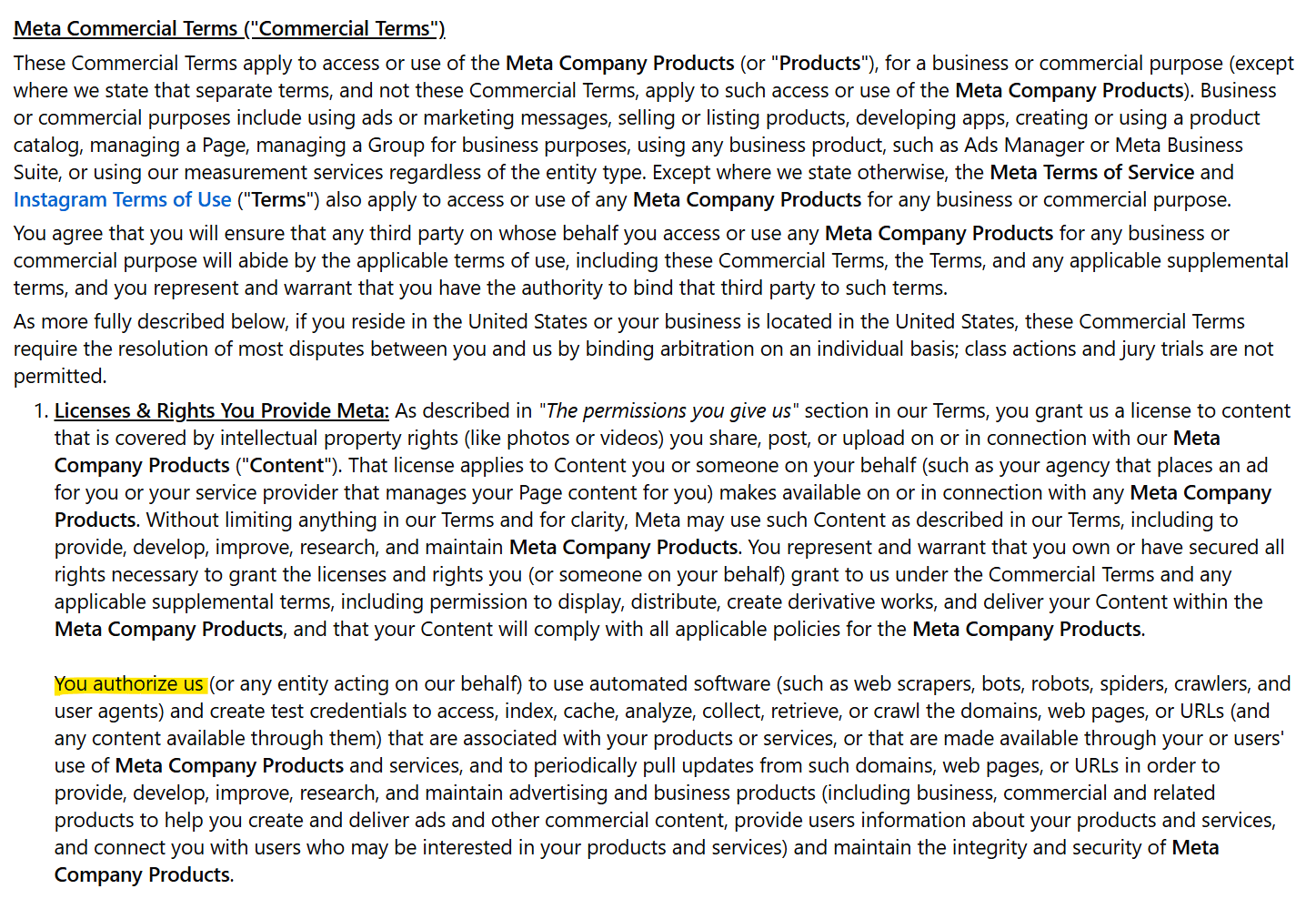
While you’re there:
- Save a copy. Print the page to PDF with today’s date. Meta has already changed the preview once, so a dated copy shows exactly what you were agreeing to.
- Check the language version. The page footer has a language switcher. Reports show the U.S. and U.K. English versions haven’t always matched.
- If you run Meta ads, read the Self-Serve Ad Terms too. Some reporting says the ad terms advertisers already accepted contain similar crawling language, so this may not be the first time you’ve agreed to it.
Read the fully updated Terms & Conditions on 10/30/2026 here.
2. Block Meta’s AI Training Crawler in robots.txt
Your website has a small text file at yourwebsite.com/robots.txt that tells automated visitors which areas they may access. Meta’s developer documentation lists several crawlers, each for a different job:
- Meta-ExternalAgent crawls the web “for use cases such as training foundation AI models.” This is the one to block if AI training is your concern.
- Meta-WebIndexer helps Meta AI search results. Meta says allowing it helps Meta AI cite and link to your content. Block it if you don’t want to appear in Meta AI answers, or allow it if you’d like the visibility.
- Meta-ExternalAds crawls for advertising and business products. If you run Meta ads or use a product catalog, talk to whoever manages your ads before blocking it, since Meta doesn’t say how blocking it affects ad delivery.
- FacebookExternalHit creates the link preview (the image, headline and description) when someone shares your link on Facebook, Instagram or Messenger. Do not block this one. If you do, your shared links can show up as bare links with no image or headline, and those posts tend to get less attention.
To block only the AI training crawler, add these two lines to your robots.txt file:
User-agent: meta-externalagent
Disallow: /
If you also want to keep out of Meta AI search, add:
User-agent: Meta-WebIndexer
Disallow: /
Don’t touch any lines for facebookexternalhit. If you use WordPress, Wix, Squarespace or Shopify, your platform or an SEO plugin usually has a place to edit robots.txt. Meta says changes can take up to 24 hours to take effect because its crawlers cache the file.
A caveat. Robots.txt is a request, not a lock. Meta’s own documentation says Meta-ExternalFetcher “may bypass robots.txt” when a user asks Meta AI to fetch a page, and FacebookExternalHit might bypass it during security checks. It’s still the best tool you have, and it’s the one Meta has publicly said it respects. If you have a developer, they can also check your server logs to see which Meta crawlers are already visiting.
3. Know What You Can and Can’t Opt Out Of
Here’s where things stand for U.S. businesses as of October 20, 2026:
- The new Commercial Terms: you can’t opt out and keep using Meta for business. Continuing to use it means you accept them.
- Crawling of your website: you can signal “no” with robots.txt, as shown above. That is the main control Meta offers.
- AI training on your public posts: users in the EU and U.K. have a form to object. In the U.S., there’s no general opt-out from AI training on public posts. Meta does offer a Privacy Center request if your personal information shows up in a Meta AI response, but that only covers your personal details, not your posts.
- Content that has already been used: any objection or block only applies going forward.
4. Keep Your Originals
Make a habit of saving master copies of everything you create: original photos at full size, video files, blog drafts and product descriptions. Store them in a dated folder in your own cloud storage, not just on social media. If your work is ever copied, original files with dates are your best proof of authorship.
If you create a lot of original work, like photography, design or long-form writing, consider registering your most valuable pieces with the U.S. Copyright Office. Registration gives you stronger legal options if you ever need to enforce your rights.
5. Own Your Channels
This is a lesson we come back to every time a platform changes its rules. Social media is rented space. Your website, your email list and your Google Business Profile are not.
- Your website is your home base. Make sure your best content, your services and your contact information live there, not only on Facebook.
- Your email list goes straight to your customers, with no algorithm in between. If you don’t have one, start one now with a simple signup form and a reason to join, like a monthly special.
- Your Google Business Profile is usually the first thing local customers see. Keep your hours, photos and reviews current.
6. If You Decide to Leave, Leave the Right Way
If you choose to step away from Facebook, plan your exit so your customers can follow you:
- Download your Page data first. Use Meta’s “Download your information” tool (in Page settings or Accounts Center) to save your posts, photos and messages. Once a Page is deleted, that content is gone.
- Tell your followers where to find you. Post several times before your deadline with your website, email signup and any other places you’ll be. Pin the final post to the top.
- Collect emails before you go. Run a simple signup offer so your most loyal followers join your list.
- Consider a placeholder instead of deleting. You can keep the Page with a pinned post directing people to your website, or deactivate it rather than delete it, which Facebook lets you reverse later. That protects your business name and keeps customers who search for you from hitting a dead end.
- Update your links everywhere. Remove Facebook icons from your website, email signature, business cards and Google Business Profile so customers don’t click into a closed Page.
7. Use AI on Your Own Terms
AI is definitely not going away, so make it work for you instead of the other way around.
- Decide what goes in. Don’t paste unpublished work or anything confidential into AI tools.
- Keep your voice human. Use AI for rough drafts and ideas, then rewrite in your own words.
- Read the settings. A lot of AI tools have options about whether your inputs are used for training.
If you’re curious about the AI tools Meta is building for Instagram too, like what they can do, where they’re helpful and where they still need a human touch, we broke it down in Should You Try Meta Muse? What Instagram’s AI Can Do. It’s a good next read if you’re trying to figure out which AI tools are worth your time as a local business owner.
Frequently Asked Questions
Does Meta’s new business agreement let it train AI on my website?
The original version said Meta could use content from websites linked to your business to “train” its products. The revised U.S. version removed “train” and limits use to “advertising and business products” and security.
Meta says it isn’t using these terms to scrape sites for AI training, but legal experts say “develop” could still be read broadly. Blocking Meta-ExternalAgent in robots.txt is the clearest way to say no to AI training.
When do Meta’s new Commercial Terms take effect?
October 30, 2026. If you keep using Facebook, Instagram, WhatsApp or Messenger for business after that date, you’re agreeing to them.
Can I opt out of Meta’s new terms?
Not if you want to keep using Meta for business. Your options are to accept them or stop using Meta’s products for business purposes. You can still limit Meta’s crawlers on your website with robots.txt.
Will blocking Meta’s crawlers hurt my Facebook link previews?
Only if you block FacebookExternalHit. Link previews come from FacebookExternalHit, so leave that one alone. Blocking Meta-ExternalAgent, the AI training crawler, doesn’t affect your link previews.
Does Meta use my business Page posts to train AI?
Meta says it uses publicly shared posts from Facebook and Instagram to develop its AI, and business Pages are public. That policy is separate from the October 30 update. In the U.S., there’s currently no general way to opt out of it.
Should I delete my business Facebook Page?
For most local businesses, usually not. You’d lose reach, reviews and leads, and deleting doesn’t undo past AI training or stop other companies’ crawlers. If you do decide to leave, download your data, move your followers to your email list and website, and consider keeping a placeholder Page.
Is using AI for my business the same as stealing?
Not by itself. This fight is about how AI companies gather the material they train on, not about a business owner using a tool to draft a caption. Use AI as a helper, keep your own voice and don’t feed it anything confidential.
Need Help Protecting Your Website and Content?
Dillon Media Group helps Ocala and North Central Florida businesses with websites, social media and digital marketing every day. We can check your robots.txt, review how your Meta accounts are set up and help you build the channels that work best for you.
If you have questions, call us at 352-895-0831 or email clinton@dillonmediagroup.com for a free consultation. Let’s make sure your work keeps working for you.
Sources
Nieman Lab, Meta’s new commercial terms will allow the scraping of news sites, legal experts say (www.niemanlab.org/metas-new-commercial-terms-will-allow-the-scraping-of-news-sites-legal-experts-say) (Oct 15, 2026)
Nieman Lab, Legal experts warn Meta’s new terms still grant broad scraping permissions, despite language changes (www.niemanlab.org/legal-experts-warn-metas-new-terms-still-grant-broad-scraping-permissions-despite-language-changes) (Oct 17, 2026)
TechCrunch, Meta removes language that raised scraping and AI training concerns (techcrunch.com/meta-removes-language-that-raised-scraping-and-ai-training-concerns) (Oct 17, 2026)
Search Engine Journal, Meta Drops Training From Its Crawl Clause And Keeps The Crawl (www.searchenginejournal.com/meta-removes-training-crawl-clause-commercial-terms) (Oct 19, 2026)
Meta, Commercial Terms preview, effective Oct 30, 2026 (www.facebook.com/legal/commercial_terms_preview) (accessed Oct 19, 2026)
Meta for Developers, Meta Web Crawlers (developers.facebook.com/docs/sharing/webmasters/web-crawlers) (accessed Oct 19, 2026)
Meta Transparency Center, AI at Meta training data (transparency.meta.com/features/ai-at-meta-training-data) (accessed Oct 19, 2026)
Firstpost, Meta removes AI training clause after backlash over web scraping concerns (www.firstpost.com/tech) (Oct 19, 2026)
iTechPost, Meta Removes Controversial AI Training Language Over Website Scraping Concerns (www.itechpost.com/articles/meta-removes-controversial-ai-training-language-over-website-scraping-concerns.htm) (Oct 19, 2026)
Startup Fortune, Meta quietly deletes AI training clause from its new business terms (startupfortune.com/meta-quietly-deletes-ai-training-clause-from-its-new-business-terms) (Oct 18, 2026)
Social Media Today, Meta updates Terms of Service amid concerns around data scraping (www.socialmediatoday.com/news/meta-updates-terms-of-service-amid-concerns-around-data-scraping) (Oct 18, 2026)
Homespun Seasonal Living, Facebook post on deleting business Page (www.facebook.com/HomespunSeasonalLiving/posts) (Oct 17, 2026)
Reuters, Major publishers sue Meta for copyright infringement over AI training (www.reuters.com/sustainability/boards-policy-regulation) (May 5, 2026)
Norton, How to opt out of Meta AI (us.norton.com/blog/how-to-opt-out-of-meta-ai) (accessed Oct 19, 2026)
Facebook Help Center, About links in organic Facebook Page posts and comments (www.facebook.com/help) (accessed Oct 20, 2026)