
Is Meta One Worth It for Your Local Business Facebook Page?
If you manage a Facebook Page for your business in Ocala, Belleview, Dunnellon or anywhere in Marion County, you may have heard that Facebook is “charging for links” now. Some business owners have hit a limit when trying to add a website link to a post, and right behind it is an offer to subscribe to Meta One.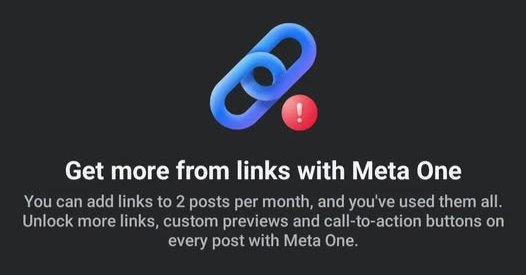
So I looked into it and read Meta’s help pages, the plan details and the reporting, and I want to walk you through what’s actually happening, what it costs to get around it and whether I think it’s worth paying for.
One quick note before we start. This is a separate change from Meta’s new business terms that take effect October 30. Those are about Meta crawling your website, and I covered them in Is Meta Using Your Business Website to Train AI?. The link cap is its own thing, tied to Meta’s new paid subscription.
Watch The Video That Breaks Down This Blog
https://drive.google.com/file/d/1LOmf9x3SP8SQ-bFYpaQwisA8xbr9mQET/view?usp=sharing
What Changed With Links on Facebook?
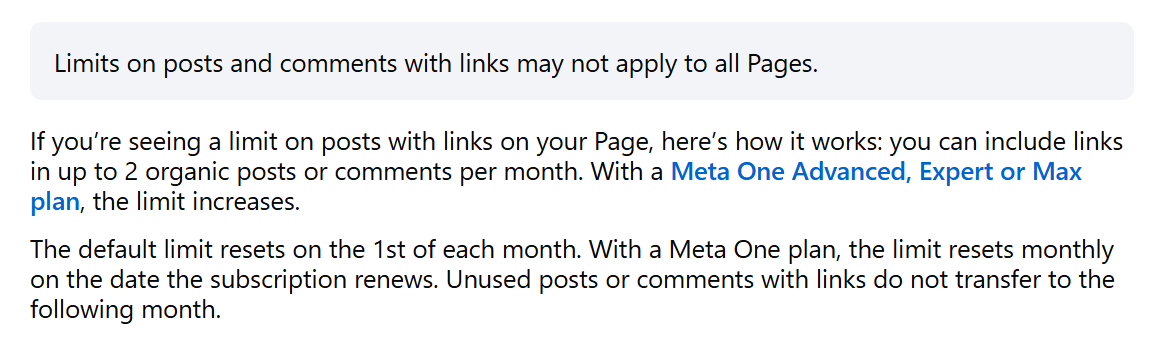
If your Page is part of Meta’s test and you don’t pay for Meta One, you get 2 chances a month to share an external, organic link that takes people off Facebook, like a link to your website, your online menu or your booking page.
Those 2 chances cover both your posts and your comments. So if you’ve been using the old trick of posting a photo and dropping the link in the first comment, that comment now uses up one of your 2. A few more details about it:
- It’s counted by post or comment, not by link. One post with three links in it counts as one.
- The link count starts over on the 1st of every month. If you’re on a paid Meta One plan, your link count starts over on the day your subscription renews instead.
- Use them or lose them. If you only share one link in October, you don’t get three in November.
Which Links Don’t Count
Meta lists a handful of links that don’t touch your monthly allowance:
- Extra links in the comments of a post that already has a link (once a post has used up one of your 2, you can add more links in its comments)
- Links to Meta’s own apps, including Facebook, Instagram, WhatsApp and Threads
- Links for affiliate partners connected through Facebook’s affiliate partnerships
- Links in ads. When you pay to run an ad, the link still works like it always has.
Who’s Affected and Who Isn’t
Meta’s own wording is that the limits “may not apply to all Pages.” Meaning, it’s a test, and not every Page is in it.

I can tell you firsthand that we haven’t seen the counter on Dillon Media Group’s Page yet. That doesn’t mean it won’t show up, but it does show this isn’t hitting everyone all at once.
How to check your Page. Start a new post or comment from your Page and add a link to your website. If your Page is in the test, Facebook shows a counter with how many link posts you have left this month. If you don’t see one, you’re not limited right now.
A few other things reporting has turned up:
- Personal profiles and Facebook Groups aren’t part of the test. This is about business Pages.
- News publishers are reportedly excluded for now, though Meta hasn’t said how it decides who counts as a publisher.
- After you hit the limit, people in the test say their links show up as plain text that can’t be clicked.
Meta first tried a version of this in December 2025 and widened it after Meta One launched in September.
What Meta One Costs and What You Get
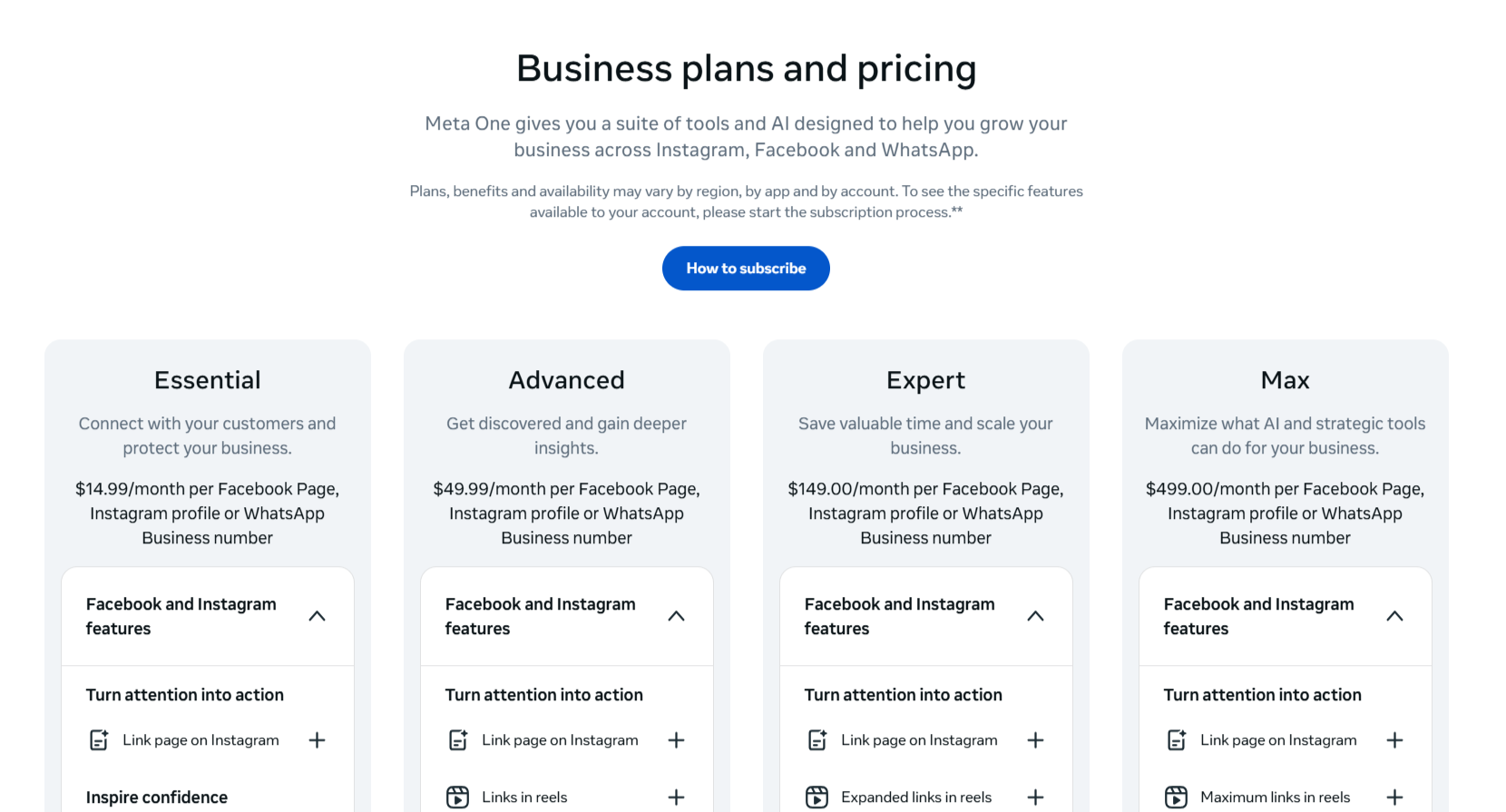
Meta launched Meta One on September 15, 2026. It’s a paid subscription that adds features across Facebook, Instagram and WhatsApp. The basic apps stay free. There are personal plans too, but for businesses there are four tiers. Here’s how they line up for Facebook links, based on Meta’s own Help Center:
| Meta One plan | Price per month (USD) | Facebook posts or comments with links per month |
|---|---|---|
| No subscription | Free | 2 |
| Essential | $14.99 | 2 |
| Advanced | $49.99 | 8 |
| Expert | $149.99 | 20 |
| Max | $499.99 | Unlimited |
Prices are from Meta’s Help Center as of October 2026. Meta says prices may vary by region, and they may change. Some launch coverage listed Expert and Max at $149 and $499.
Plans are sold per account. If your business runs more than one Page, each one needs its own subscription. So yes, if you want more control over how often you can send people from Facebook to your website, you now have to invest in it.
Essential Gets You a Badge and Protection but No Extra Links
The $14.99 Essential plan is mostly about trust and security. According to Meta, it includes:
- A verified badge on Facebook, Instagram and WhatsApp Business, once your business passes verification
- Impersonation protection, so Meta watches for accounts pretending to be you
- An upgraded links section on your Facebook profile, plus a link page on Instagram with up to 20 links
- More AI-powered replies from Meta Business Agent on WhatsApp Business
What it doesn’t include is more Facebook links. Essential gets the same 2 a month as a free Page.
Advanced and Up Add Links, Scheduling and Real Support
Advanced, at $49.99 a month, is where the link cap actually goes up. Along with 8 Facebook link posts a month, Meta lists:
- Clickable links in up to 4 Instagram posts and 4 Instagram reels a month
- Scheduling posts and reels up to a year ahead, and Instagram stories up to 30 days ahead
- Deeper insights, including data on people who see your content but don’t follow you yet, and exports to a spreadsheet
- Shared access so up to 4 people can help manage your Instagram without sharing your password
- A chat with a real human support agent once a month
Expert ($149.99) bumps you to 20 Facebook link posts and 8 Instagram posts and reels, plus human support up to 5 times a month. Max ($499.99) gives you unlimited Facebook link posts, 12 Instagram posts and reels, and human support whenever you need it.
What This Means on Instagram
Clickable links in regular Instagram posts and reels have never really been a thing, and now they’re available, but only if you pay. Advanced gets 4 posts and 4 reels a month, Expert gets 8 of each and Max gets 12 of each. Your bio link isn’t going anywhere, so nothing free is being taken away on Instagram.
Is Meta One Worth It for a Local Business?
For most local businesses I work with, probably not, at least not for the links alone.
Do the math first. Advanced runs $49.99 a month, which is about $600 a year per Page, for 8 link posts a month. That same $600 could go towards your Facebook ads, where links aren’t limited at all and you can target people right here in Marion County.
Link posts weren’t winning anyway. Meta’s own Widely Viewed Content report found that 98.7% of U.S. Facebook post views in early 2026 didn’t include a link to anything outside Facebook, according to Social Media Today. Photos, short videos and behind-the-scenes posts are what people actually see and engage with. Most link posts were underperforming long before this cap showed up.
When it might make sense. If your business sells online, takes bookings straight from Facebook or posts a lot of time-sensitive offers, a paid plan could pay for itself. The same goes if you’d use the other perks anyway, like verification, scheduling, team access and human support. Getting a real person on the line when your Page gets hacked or locked is worth something.
When to skip it. If you’re a restaurant, a contractor, a salon, a law firm or any other local service business, your customers mostly call, message or walk in. You can likely live with just 2 links a month and put that money where it’ll go farther.
My advice is to treat Meta One like any other line in your marketing budget. If it earns its keep, great. If it doesn’t, cancel it. Meta says you can cancel at any time.
Still Get Clicks Without Paying For Meta One
If your Page does hit the cap, don’t panic. Here’s what I’d do.
Spend Your 2 Links on Posts That Drive Calls or Bookings
Save your monthly links for the posts most likely to turn into business, like a new service, a limited-time special or an event that needs registrations. Skip the link on everyday posts and let the photo or video do the work.
Put Important Links in Ads
Links in ads don’t count toward the limit. If a link really matters, like a holiday promotion or a hiring push, a small, targeted ad can put it in front of the right local people. Meta hasn’t said whether boosting an existing post frees up its link, so if a link really counts for your bottom line, build it as an ad from the beginning.
Use Messenger to Send the Link
Invite people to message you for details, or set up an automatic reply that sends your booking page or menu when someone messages your Page. Meta’s rules on the cap talk about posts and comments and don’t mention messages either way, so this is a handy path for now. Messages also start an actual conversation, and that’s usually where the sale happens anyway.
Link to Your Facebook Events, WhatsApp or Instagram
Links to Meta’s own apps don’t count. Create a Facebook Event for your open house or grand opening, link to your WhatsApp Business chat or point people to your Instagram. All of those are free to share.
Make Your Page’s Website Button and Profile Links Do the Work
Your Facebook Page has two spots for your website that never count toward the monthly limit. One is the website field in your Page’s About section. The other is the action button at the top of your Page, like “Book Now,” “Call Now” or “Shop Now.” Make sure both are filled in and point to the page you most want people to visit, like your booking page, menu or contact page. Then, instead of adding a link to every post, write something like “Book through the link on our Page.”
Lean on Google Business Profile
For local search, your Google Business Profile is usually the first thing customers see, and Google doesn’t limit your links. Post your specials and updates there too, keep your hours and photos current and keep asking for reviews.
Grow Your Email List
Email goes straight to your customers, with no algorithm and no monthly link cap. Add a simple signup form to your website and give people a reason to join, like a monthly special or early access to events.
Make Your Website Where Every Post Points
This is the same lesson from the Meta terms post. Social media is rented space, and your website is the one place you truly own. Put your services, prices, menus and contact info there. Then every post, ad, email and Google update can point back to it.
Use Instagram’s Bio Link
Your Instagram bio link is still free. Keep it pointed at your most important page and update it when you’re running something special. If you’re on Essential or higher, Meta’s Instagram link page lets you list up to 20 links in one spot.
Meta Keeps Changing the Rules for Businesses
If this feels like a lot, it is! In the span of a few weeks, Meta launched a paid subscription, started capping links on some Pages and rolled out new business terms that take effect October 30. The older Meta Verified subscription is also being folded into Meta One.
None of that means you should walk away from Facebook. For a lot of Ocala businesses, it’s still where customers are going to find you, read your reviews and send you messages. But it is a good reminder not to build your whole business on a platform you don’t control. Keep using Facebook for what it’s good at, and keep building the channels you own.
If you’re curious about where Meta is heading with AI on Instagram, we broke that down in Should You Try Meta Muse?.
Frequently Asked Questions
Does the Facebook link limit apply to every Page?
No. Meta says the limits may not apply to all Pages, and it’s still a test. If your Page is included, you’ll see a counter when you add a link to a post or comment. We haven’t seen it on our own Page yet.
Do links in comments count toward the limit?
Yes. Links in comments your Page posts count the same as links in posts. The one exception is extra links in the comments of a post that already includes a link.
Does Meta One Essential give me more links?
No. Essential costs $14.99 a month and includes a verified badge and impersonation protection, but it keeps you at 2 link posts a month. You need Advanced or higher for more.
Do links in Facebook ads count?
No. Links in ads don’t count toward the monthly limit.
Is the link limit part of Meta’s new October 30 business terms?
No. The updated Commercial Terms don’t mention link limits or Meta One. The cap is a separate change tied to Meta’s Meta One subscription, and it just happens to be rolling out the same fall.
Will Meta One help my posts reach more people?
Meta doesn’t promise that. The Advanced plan lists a chance to be featured in Feed and easier search, but those aren’t guarantees, and paying for more links doesn’t mean more people will see those posts.
Can I still share links on Instagram for free?
Yes, through your bio link. Clickable links in regular Instagram posts and reels are only available on Meta One Advanced and higher.
Need Help Getting Clicks From Facebook?
Dillon Media Group helps Ocala and North Central Florida businesses with social media, ads, websites and digital marketing every day. We can check whether your Page is affected, plan which posts get your links, set up Messenger replies and ads, and build the website and email list that keep working no matter what Meta changes next.
Call us at 352-895-0831 or email clinton@dillonmediagroup.com for a free consultation. Let’s make sure your customers can still find their way to you.
Sources
Facebook Help Center, About links in organic Facebook Page posts and comments (https://www.facebook.com/help/1929252614431792) (accessed Oct 20, 2026)
Meta Help Center, About Meta One Plans (https://www.meta.com/help/subscriptions/960854640235758/) (accessed Oct 20, 2026)
Meta Help Center, How to add links to your posts and reels on Instagram with Meta One (https://www.meta.com/help/subscriptions/1121274400471172/) (accessed Oct 20, 2026)
Reuters, Meta launches subscriptions with enhanced AI features (https://www.reuters.com/business/meta-launches-subscriptions-with-enhanced-ai-features-2026-09-15/) (Sept 15, 2026)
The Verge, Meta’s new One subscriptions put a price on social media and AI (https://www.theverge.com/tech/995453/meta-one-subscriptions-ai) (Sept 15, 2026)
Social Media Today, Meta launches Meta One for Business add-on packages (https://www.socialmediatoday.com/news/meta-launches-meta-one-for-business-add-on-packages/830469/) (Sept 2026)
Social Media Today, Facebook Pages get charged for link posts (https://www.socialmediatoday.com/news/facebook-pages-get-charged-for-link-posts/830743/) (Sept 17, 2026)
Press Gazette, Facebook cash-for-links scheme excludes publishers (for now) (https://pressgazette.co.uk/platforms/facebook-cash-for-links-scheme-excludes-publishers-for-now/) (Oct 7, 2026)
Sprout Social, What to know about Meta One, Facebook Link Limits, and Publishing via Sprout(https://support.sproutsocial.com/hc/en-us/articles/49307491653773-What-to-know-about-Meta-One-Facebook-Link-Limits-and-Publishing-via-Sprout) (Oct 1, 2026)
Meta, Commercial Terms preview, effective Oct 30, 2026 (https://www.facebook.com/legal/commercial_terms_preview) (accessed Oct 20, 2026)