
You Can Now Advertise Your Business on Apple Maps
Did you know that 1 in 2 business searches on Apple Maps results in someone taking action? Yes, HALF! They search. They find a business. Then they call, get directions, visit the website, look at photos, or do something that moves them a little closer to becoming a customer. And now, you can advertise directly on Apple Maps!
This new feature is especially interesting because people usually aren’t opening Maps just for fun. They’re trying to go somewhere. They need lunch. They need a mechanic. They need a roofer. They need whatever business solves the problem they are having right now.
That makes Apple Maps a pretty valuable place to be seen.
Where Do Apple Maps Ads Show Up?
Apple currently offers two main opportunities for an ad to appear inside Maps:
Before Someone Searches: The first placement is in Suggested Places, before someone types in a search. So Apple can show sponsored businesses while users are still exploring, which gives you an opportunity to get in front of them before they’ve narrowed down exactly where they want to go.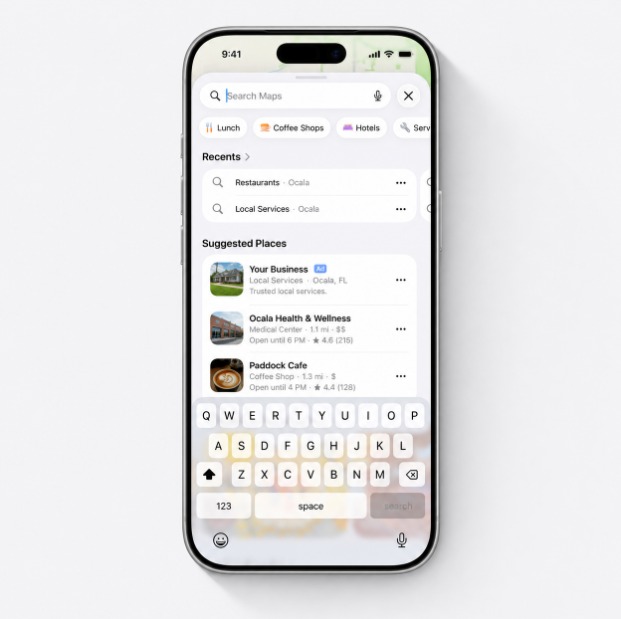
After Someone Searches: Your ad can also appear when someone searches for something relevant to your business. Think: "Restaurants near me." The person searching already knows what they want.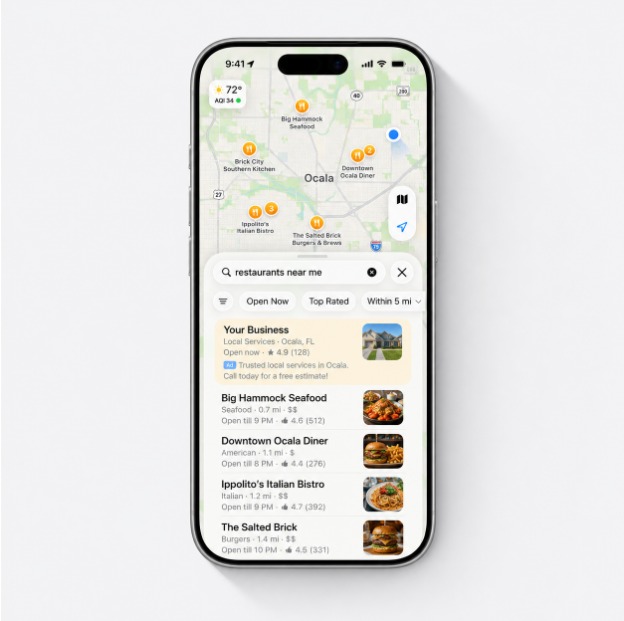
But Before You Spend a Dollar on Apple Maps Ads, Do This
Before you start thinking about running an Apple Maps ad, there is something much more important to do: Claim your business listing.
Seriously, if you do one thing after reading this, go check your business on Apple Maps. Your business may already be there, even if you have never personally created or managed the listing, and if you don’t claim it, Apple will build a listing for you automatically using third-party data from Yelp. Yelp’s an aggregator that pulls from various spots across the web, and that data isn’t always accurate.
So search for your business and check it:
Is your phone number correct?
Are your hours right?
Does the website link actually go to your website?
Is your address correct?
Are the photos any good?
The last thing you want is someone searching for your business, finding you, and then getting sent to the wrong place because the address is outdated. Or calling an old phone number. Or seeing that you’re closed when you’re very much open.
How to Claim Your Business on Apple Maps
Apple manages business listings through Apple Business. You’ll need an active Apple ID and your business information to get started. From there, Apple will take you through the verification process so you can prove that you’re authorized to manage the business. This process isn’t necessarily user-friendly and it can take some time to verify your business listing.
Once you’re verified, you can claim or add your locations and start updating the information customers see. It’s worth the extra few minutes to fill everything out!
Add your hours.
Choose the most accurate business category.
Upload good photos.
Check your address.
Check the entrance location on the map.
Make sure the phone number and website are right.
Then We Can Talk About Ads
Once your Apple Business account and locations are set up, you can move into Apple Maps advertising.
You can choose which locations you want to promote, set a budget, and advertise to people who are searching on Maps. Apple says campaigns can be started and stopped as needed.
Now, when somebody in your area pulls out their iPhone and asks where they should go next, your business has a chance to be the answer.
So go look yourself up. Make sure Apple has your business right. Claim your listing.
Because if 1 in 2 business searches leads to an action, we’d really prefer that action to involve you.